> ## Documentation Index
> Fetch the complete documentation index at: https://developers.ambersearch.de/llms.txt
> Use this file to discover all available pages before exploring further.
# Indexing API Overview
> Push custom content into amberSearch to make it searchable alongside your other data sources.
## Overview
The amberSearch Indexing API enables your organization to push content from internal tools, on-premises systems, and proprietary applications into amberSearch's search index. Documents pushed through this API become discoverable alongside content from all your natively connected data sources.
The Indexing API is designed for a **push-based** integration model. Instead of amberSearch pulling data from your system, your application pushes documents (one at a time or in batches) directly to amberSearch via HTTP API calls.
The public `/api/indexing` endpoints are a thin **proxy** layer in front of amberSearch's internal indexing service. Each request you send is forwarded to the downstream service, which performs the actual extraction and indexing work. HTTP status codes and error envelopes are preserved verbatim, so the responses you observe come directly from the indexing pipeline.
## Browse this guide
These pages are not listed in the site sidebar. Use the cards below (or the [recommended order](#recommended-reading-order) at the end) to move between topics.
This page --- API overview, auth, quick examples
Create datasource, sub-datasources, object types, property schemas
Single + bulk indexing, fields, update, delete, error handling
Users, groups, anonymous access, check-access
## Common Use Cases
* **Internal Tool Integration** --- Make content from proprietary or on-premises tools searchable in amberSearch.
* **Legacy System Modernization** --- Bring content from older systems into modern search and AI workflows.
* **Custom Application Data** --- Index structured data from internal applications and databases.
* **Document Repositories** --- Make file servers, wikis, and document management systems searchable.
* **Ticketing & CRM Data** --- Push tickets, cases, and customer data for unified search.
## How It Works
Register the datasource and declare object types, custom property definitions, and the optional sub-datasource hierarchy in one call. See [Datasource & custom properties](/indexing-api/setup-datasource).
Push documents with `POST /documents` --- send a single document or an array under `documents`. For each one you choose between **file binaries** (server-side extraction) and **clean `text_content`** you supply yourself. Updates and deletes use the same endpoint family. See [Index documents](/indexing-api/index-documents).
Set access controls so users only see content they are authorized to view. Documents without an explicit `permissions` block are treated as anonymous and visible to everyone **registered on that datasource** (`POST /users`) --- not to your whole org. A user with no record on the datasource sees none of its documents. See [Permissions](/indexing-api/permissions).
Documents become discoverable through amberSearch's search and AI features once the server commits them to the index. This is controlled server-side and can take **up to 2 hours**.
## Base URL
All Indexing API endpoints are available under:
```
https://customerDomain.ambersearch.de/api/indexing
```
## Authentication
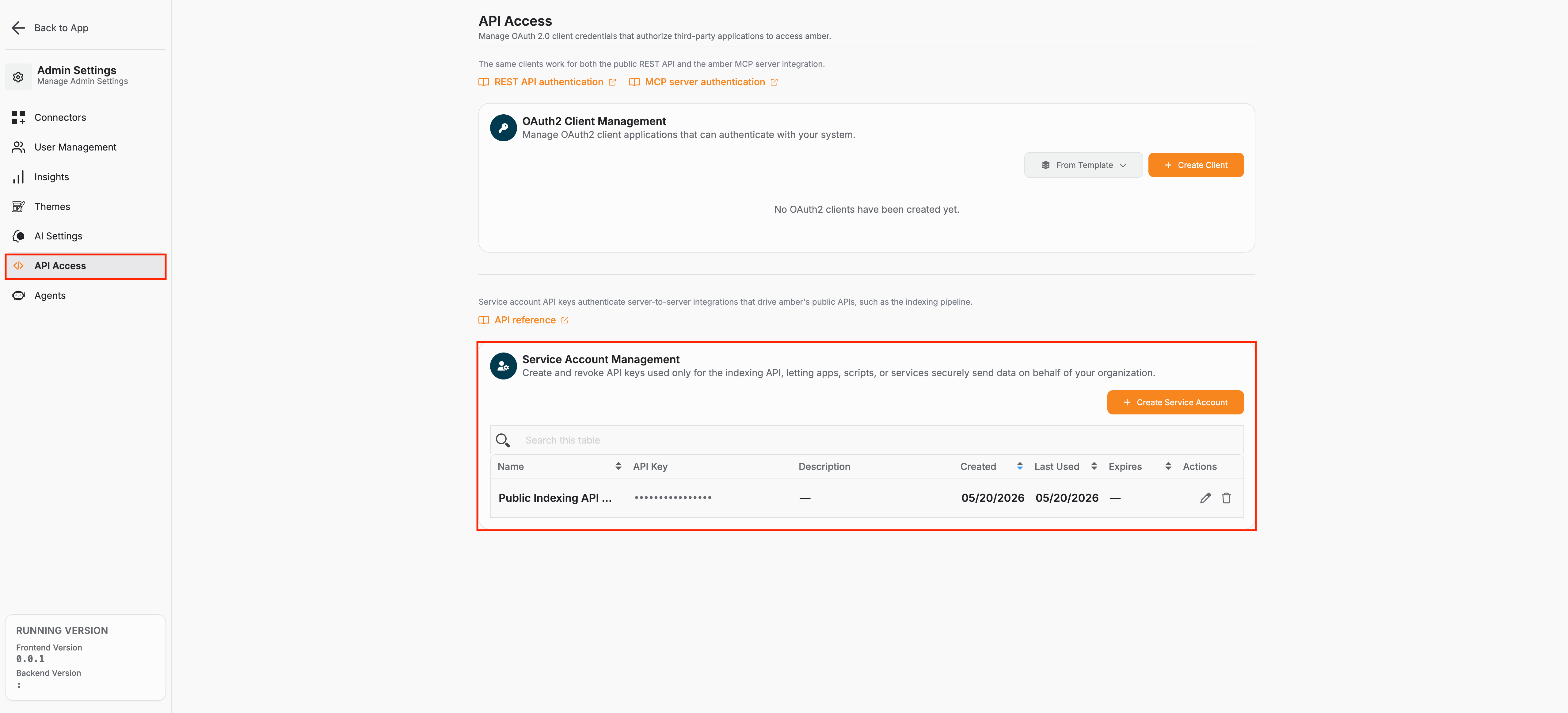
You need the **Administrator** and **Developer** roles in amberSearch to create an indexing service account.
The Indexing API authenticates with a **service-account API key** sent as a Bearer token:
```http theme={null}
Authorization: Bearer amsa_
```
Service-account tokens are created by an administrator from the **Service Accounts** page in the amberSearch dashboard UI. Each token begins with the `amsa_` prefix so leaked credentials are easy to spot in logs. The secret is shown **only once** at creation time — store it in your secret manager immediately, then use it in place of `YOUR_API_KEY` in the examples on these pages.
 ```bash theme={null}
curl -X POST "https://customerDomain.ambersearch.de/api/indexing/datasources" \
-H "Authorization: Bearer YOUR_API_KEY" \
-H "Content-Type: application/json" \
-d '{ ... }'
```
### Linking people who search to your indexed data
Who can see a document in amberSearch is evaluated against **the same person who signs in to amber**. The **required** way to connect that logged-in identity to the Indexing API is the user's **email attribute** --- the email on their amberSearch account (as provided by your identity provider / directory and stored on the user in amber).
* When you index users, set **`user.email`** to that **exact** login email.
* In permissions and group memberships, refer to people **by that email** (`allowed_users`, `member_email` for memberships, and checks that take `user_email`).
Do not rely on arbitrary external IDs alone to represent "who is logged in"; amber resolves search visibility using the email tied to the amber user.
## Naming rules at a glance
A few identifiers must be **slugs** in `word_word` form (lowercase letters/digits separated by single underscores --- no hyphens, no spaces, no leading digit):
* **Datasource `name`** (e.g. `internal_wiki`)
* **Sub `key`** (e.g. `engineering`, `runbooks`)
Group names cannot contain whitespace and cannot start with `amber` (case-insensitive). Document `id`s are free-form alphanumeric with hyphens, underscores, and dots.
## Quick Example
Here's how to create a datasource and index your first document:
**1. Create a datasource:**
```bash theme={null}
curl -X POST "https://customerDomain.ambersearch.de/api/indexing/datasources" \
-H "Authorization: Bearer YOUR_API_KEY" \
-H "Content-Type: application/json" \
-d '{
"name": "internal_docs",
"display_name": "Internal Documentation"
}'
```
**2. Index a document:**
```bash theme={null}
curl -X POST "https://customerDomain.ambersearch.de/api/indexing/documents" \
-H "Authorization: Bearer YOUR_API_KEY" \
-H "Content-Type: application/json" \
-d '{
"documents": {
"datasource": "internal_docs",
"id": "getting-started-guide",
"title": "Getting Started Guide",
"body": {
"mime_type": "text/plain",
"text_content": "This guide helps new employees get up to speed quickly..."
},
"file_type": "page",
"path_preview": "https://internal.company.com/docs/getting-started",
"last_modified": "2026-05-01T09:00:00Z",
"permissions": { "allow_anonymous_access": true }
}
}'
```
The same endpoint accepts an **array** under `documents` for bulk indexing — a separate bulk route is not needed. See [Index documents](/indexing-api/index-documents#index-multiple-documents).
## Common HTTP responses
These responses can come back from **any** endpoint and are not repeated in the per-endpoint tables on the other pages.
| Code | When it occurs |
| -------------------------------------------------- | ------------------------------------------------------------------------------------------------------------------------------------------------------------------------------------------------------------------------------------------------------------------------------------------------------------------------------------------------------------------------------------------------------------------------------------- |
| **401 Unauthorized** | The `Authorization: Bearer …` header is missing or the service-account token is invalid / expired. |
| **422 Unprocessable Entity** *(Pydantic envelope)* | Request body or path failed Pydantic validation — missing required field, regex mismatch (e.g. `name` not in `word_word` slug form), wrong type, `max_length` exceeded, `body` with both `text_content` and `binary_base64`, decoded `binary_base64` over 100 MB, or `MembershipDefinition` without exactly one of `member_email` / `member_group_name`. Response shape: `{"detail": [{"loc": [...], "msg": "...", "type": "..."}]}`. |
| **500 Internal Server Error** | Unhandled server error (DB outage, etc.). Safe to retry. |
Service-layer validation errors (custom-property and sub-reference schema violations) use a **different envelope** with an `error_code` field — see [Schema validation & errors](/indexing-api/index-documents#schema-validation-errors) on the Index documents page.
## Limits & timing
The Indexing API does **not** apply a per-minute request quota. The only hard limit enforced today is the **per-document binary payload size**: `binary_base64` bodies are capped at **100 MB (decoded)** by default. The cap is enforced by the downstream indexing service (the public `/api/indexing` proxy does **not** decode binaries itself), so an oversize payload is rejected upstream and the error is forwarded verbatim. The default is controlled by the `indexing_api_max_binary_bytes` setting — ask your operator if you need it raised.
Indexed content is not immediately searchable. The server commits new data to the search index on its own schedule, which can take up to 2 hours.
## Recommended reading order
1. [**Datasource & custom properties**](/indexing-api/setup-datasource) --- create the datasource, sub-datasource tree, object types, and property definitions.
2. [**Index documents**](/indexing-api/index-documents) --- push and update documents (single or bulk), bodies, and per-document permissions.
3. [**Permissions**](/indexing-api/permissions) --- users, groups, memberships, and access checks.
## Next Steps
Datasource, sub-datasources, object definitions, property schemas, and sending values on documents.
Index, update, and delete documents (single or bulk).
Configure fine-grained access controls for your indexed documents.
```bash theme={null}
curl -X POST "https://customerDomain.ambersearch.de/api/indexing/datasources" \
-H "Authorization: Bearer YOUR_API_KEY" \
-H "Content-Type: application/json" \
-d '{ ... }'
```
### Linking people who search to your indexed data
Who can see a document in amberSearch is evaluated against **the same person who signs in to amber**. The **required** way to connect that logged-in identity to the Indexing API is the user's **email attribute** --- the email on their amberSearch account (as provided by your identity provider / directory and stored on the user in amber).
* When you index users, set **`user.email`** to that **exact** login email.
* In permissions and group memberships, refer to people **by that email** (`allowed_users`, `member_email` for memberships, and checks that take `user_email`).
Do not rely on arbitrary external IDs alone to represent "who is logged in"; amber resolves search visibility using the email tied to the amber user.
## Naming rules at a glance
A few identifiers must be **slugs** in `word_word` form (lowercase letters/digits separated by single underscores --- no hyphens, no spaces, no leading digit):
* **Datasource `name`** (e.g. `internal_wiki`)
* **Sub `key`** (e.g. `engineering`, `runbooks`)
Group names cannot contain whitespace and cannot start with `amber` (case-insensitive). Document `id`s are free-form alphanumeric with hyphens, underscores, and dots.
## Quick Example
Here's how to create a datasource and index your first document:
**1. Create a datasource:**
```bash theme={null}
curl -X POST "https://customerDomain.ambersearch.de/api/indexing/datasources" \
-H "Authorization: Bearer YOUR_API_KEY" \
-H "Content-Type: application/json" \
-d '{
"name": "internal_docs",
"display_name": "Internal Documentation"
}'
```
**2. Index a document:**
```bash theme={null}
curl -X POST "https://customerDomain.ambersearch.de/api/indexing/documents" \
-H "Authorization: Bearer YOUR_API_KEY" \
-H "Content-Type: application/json" \
-d '{
"documents": {
"datasource": "internal_docs",
"id": "getting-started-guide",
"title": "Getting Started Guide",
"body": {
"mime_type": "text/plain",
"text_content": "This guide helps new employees get up to speed quickly..."
},
"file_type": "page",
"path_preview": "https://internal.company.com/docs/getting-started",
"last_modified": "2026-05-01T09:00:00Z",
"permissions": { "allow_anonymous_access": true }
}
}'
```
The same endpoint accepts an **array** under `documents` for bulk indexing — a separate bulk route is not needed. See [Index documents](/indexing-api/index-documents#index-multiple-documents).
## Common HTTP responses
These responses can come back from **any** endpoint and are not repeated in the per-endpoint tables on the other pages.
| Code | When it occurs |
| -------------------------------------------------- | ------------------------------------------------------------------------------------------------------------------------------------------------------------------------------------------------------------------------------------------------------------------------------------------------------------------------------------------------------------------------------------------------------------------------------------- |
| **401 Unauthorized** | The `Authorization: Bearer …` header is missing or the service-account token is invalid / expired. |
| **422 Unprocessable Entity** *(Pydantic envelope)* | Request body or path failed Pydantic validation — missing required field, regex mismatch (e.g. `name` not in `word_word` slug form), wrong type, `max_length` exceeded, `body` with both `text_content` and `binary_base64`, decoded `binary_base64` over 100 MB, or `MembershipDefinition` without exactly one of `member_email` / `member_group_name`. Response shape: `{"detail": [{"loc": [...], "msg": "...", "type": "..."}]}`. |
| **500 Internal Server Error** | Unhandled server error (DB outage, etc.). Safe to retry. |
Service-layer validation errors (custom-property and sub-reference schema violations) use a **different envelope** with an `error_code` field — see [Schema validation & errors](/indexing-api/index-documents#schema-validation-errors) on the Index documents page.
## Limits & timing
The Indexing API does **not** apply a per-minute request quota. The only hard limit enforced today is the **per-document binary payload size**: `binary_base64` bodies are capped at **100 MB (decoded)** by default. The cap is enforced by the downstream indexing service (the public `/api/indexing` proxy does **not** decode binaries itself), so an oversize payload is rejected upstream and the error is forwarded verbatim. The default is controlled by the `indexing_api_max_binary_bytes` setting — ask your operator if you need it raised.
Indexed content is not immediately searchable. The server commits new data to the search index on its own schedule, which can take up to 2 hours.
## Recommended reading order
1. [**Datasource & custom properties**](/indexing-api/setup-datasource) --- create the datasource, sub-datasource tree, object types, and property definitions.
2. [**Index documents**](/indexing-api/index-documents) --- push and update documents (single or bulk), bodies, and per-document permissions.
3. [**Permissions**](/indexing-api/permissions) --- users, groups, memberships, and access checks.
## Next Steps
Datasource, sub-datasources, object definitions, property schemas, and sending values on documents.
Index, update, and delete documents (single or bulk).
Configure fine-grained access controls for your indexed documents.