

Overview
The amber Indexing API enables your organization to push content from internal tools, on-premises systems, and proprietary applications into amber’s search index. Documents pushed through this API become discoverable alongside content from all your natively connected data sources.The Indexing API is designed for a push-based integration model. Instead of amber pulling data from your system, your application pushes documents (one at a time or in batches) directly to amber via HTTP API calls.
The public
/api/indexing endpoints are a thin proxy layer in front of amber’s internal indexing service. Each request you send is forwarded to the downstream service, which performs the actual extraction and indexing work. HTTP status codes and error envelopes are preserved verbatim, so the responses you observe come directly from the indexing pipeline.Browse this guide
These pages are not listed in the site sidebar. Use the cards below (or the recommended order at the end) to move between topics.Overview
This page --- API overview, auth, quick examples
Datasource & custom properties
Create datasource, sub-datasources, object types, property schemas
Index documents
Single + bulk indexing, fields, update, delete, error handling
Permissions
Users, groups, anonymous access, check-access
Common Use Cases
- Internal Tool Integration --- Make content from proprietary or on-premises tools searchable in amber.
- Legacy System Modernization --- Bring content from older systems into modern search and AI workflows.
- Custom Application Data --- Index structured data from internal applications and databases.
- Document Repositories --- Make file servers, wikis, and document management systems searchable.
- Ticketing & CRM Data --- Push tickets, cases, and customer data for unified search.
How It Works
1
Create a datasource (with subs and property schemas)
Register the datasource and declare object types, custom property definitions, and the optional sub-datasource hierarchy in one call. See Datasource & custom properties.
2
Index content
Push documents with
POST /documents --- send a single document or an array under documents. For each one you choose between file binaries (server-side extraction) and clean text_content you supply yourself. Updates and deletes use the same endpoint family. See Index documents.3
Configure permissions
Set access controls so users only see content they are authorized to view. Documents without an explicit
permissions block are treated as anonymous and visible to everyone registered on that datasource (POST /users) --- not to your whole org. A user with no record on the datasource sees none of its documents. See Permissions.4
Search & discover
Documents become discoverable through amber’s search and AI features once the server commits them to the index. This is controlled server-side and can take up to 2 hours.
Base URL
All Indexing API endpoints are available under:Authentication
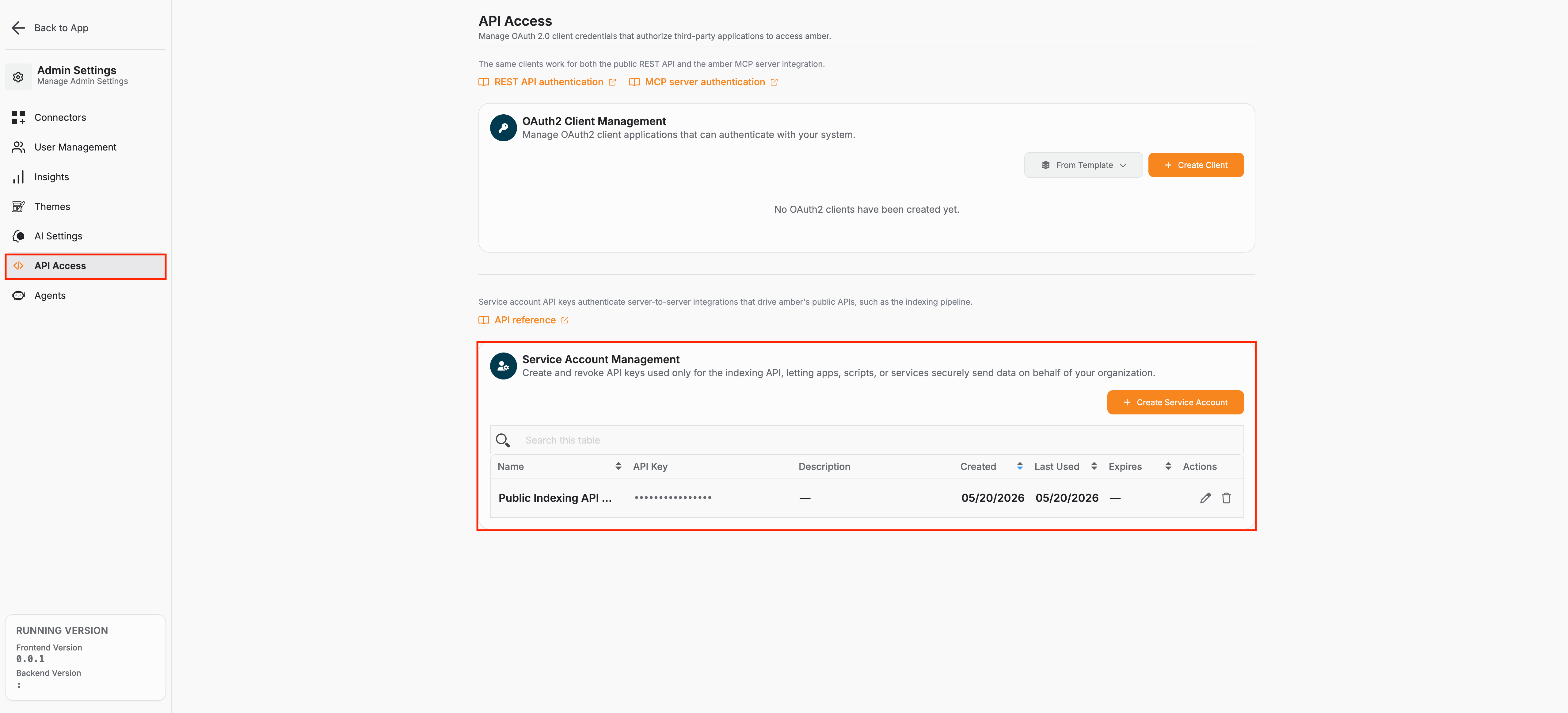
You need the Administrator and Developer roles in amber to create an indexing service account.
amsa_ prefix so leaked credentials are easy to spot in logs. The secret is shown only once at creation time — store it in your secret manager immediately, then use it in place of YOUR_API_KEY in the examples on these pages.
Linking people who search to your indexed data
Who can see a document in amber is evaluated against the same person who signs in to amber. The required way to connect that logged-in identity to the Indexing API is the user’s email attribute --- the email on their amber account (as provided by your identity provider / directory and stored on the user in amber).- When you index users, set
user.emailto that exact login email. - In permissions and group memberships, refer to people by that email (
allowed_users,member_emailfor memberships, and checks that takeuser_email).
Naming rules at a glance
A few identifiers must be slugs inword_word form (lowercase letters/digits separated by single underscores --- no hyphens, no spaces, no leading digit):
- Datasource
name(e.g.internal_wiki) - Sub
key(e.g.engineering,runbooks)
amber (case-insensitive). Document ids are free-form alphanumeric with hyphens, underscores, and dots.
Quick Example
Here’s how to create a datasource and index your first document: 1. Create a datasource:documents for bulk indexing — a separate bulk route is not needed. See Index documents.
Common HTTP responses
These responses can come back from any endpoint and are not repeated in the per-endpoint tables on the other pages.
Service-layer validation errors (custom-property and sub-reference schema violations) use a different envelope with an
error_code field — see Schema validation & errors on the Index documents page.
Limits & timing
The Indexing API does not apply a per-minute request quota. The only hard limit enforced today is the per-document binary payload size:binary_base64 bodies are capped at 100 MB (decoded) by default. The cap is enforced by the downstream indexing service (the public /api/indexing proxy does not decode binaries itself), so an oversize payload is rejected upstream and the error is forwarded verbatim. The default is controlled by the indexing_api_max_binary_bytes setting — ask your operator if you need it raised.
Indexed content is not immediately searchable. The server commits new data to the search index on its own schedule, which can take up to 2 hours.
Recommended reading order
- Datasource & custom properties --- create the datasource, sub-datasource tree, object types, and property definitions.
- Index documents --- push and update documents (single or bulk), bodies, and per-document permissions.
- Permissions --- users, groups, memberships, and access checks.
Next Steps
Datasource & custom properties
Datasource, sub-datasources, object definitions, property schemas, and sending values on documents.
Index Documents
Index, update, and delete documents (single or bulk).
Permissions
Configure fine-grained access controls for your indexed documents.